
Health Insurance Bridge
If you retire before 65, you hit a gap: you’re done with employer coverage but not yet eligible for Medicare, and you have to buy your own insurance — often the single biggest new expense of early retirement. RetireRange models this "bridge" so the cost is in your plan, not a surprise.
How RetireRange models the bridge
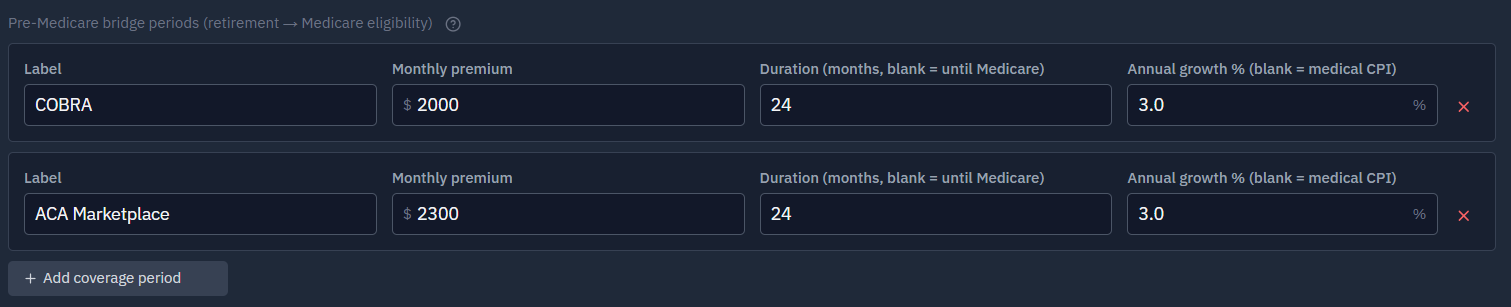
For each person, you build a bridge of up to five coverage periods that runs from their retirement date to their Medicare eligibility age. Each period has its own:
- Monthly premium (in today’s dollars), and
- Growth rate — flat (e.g., for fixed COBRA), a fixed percentage like 5%/year, or your medical-inflation rate.
That lets you model a realistic sequence rather than one flat number. A common bridge looks like:
| Period | Coverage | Roughly | Premium |
|---|---|---|---|
| 1 | COBRA | ~18 months | higher |
| 2 | ACA marketplace | until Medicare | lower |
You might add a third period for retiree coverage or a plan change. Each person has their own bridge, since spouses often retire at different times.
This COBRA-then-ACA sequence is only an example. Build the bridge from the coverage you’ll actually have. You might skip COBRA and go straight to the ACA marketplace, join a spouse’s plan, keep retiree coverage from a former employer, or combine these. The walkthrough below uses the COBRA → ACA example, but the periods are entirely yours to define.
Setting it up, step by step
You build the bridge on the Household tab, on each person’s card, in the health-insurance section. There you’ll find a Medicare eligibility age field (default 65), a Medigap premium field, and a Pre-Medicare bridge periods subsection with an Add coverage period button.
1. Add a COBRA period. Click Add coverage period and fill in the row:
- Label: COBRA
- Monthly premium: e.g. $1,500
- Duration: 18 (months)
- Annual growth %: 0 — COBRA premiums are typically flat
2. Add an ACA period. Click Add coverage period again:
- Label: ACA Marketplace
- Monthly premium: e.g. $900
- Duration: leave blank — it runs until Medicare
- Annual growth %: leave blank to grow with medical inflation
You now have two periods that play in order: COBRA for 18 months, then ACA until age 65. You can add up to five periods per person (the Add button goes away at five), and remove any with its × button.
3. Set the Medicare age and Medigap. The bridge ends automatically at the Medicare eligibility age (default 65) — lower it (say, to 64) and the bridge stops a year earlier, with Medicare premiums beginning then if you’ve enabled them. Enter your monthly Medigap premium for coverage after Medicare starts.
4. Check it on the Results tab. Run the simulation and open the medical income chart. You should see roughly $1,500/month for the first ~18 months (COBRA), then about $900/month until age 65 (ACA), after which the bridge stops and Medicare costs (if enabled) plus Medigap take over.
Where the premium money comes from
Bridge premiums are treated as a medical expense, so they’re funded exactly like every other medical cost in your plan — from your dedicated medical accounts first, then your general portfolio:
- Your medical accounts, in cascade order — VEBA first, then HSA (the default; you can reorder the cascade on the Strategy tab). Premiums drain these before anything else.
- Your general portfolio covers any remainder, drawn across your accounts using your normal withdrawal allocation.
Two implications worth knowing:
- The premium grows at your medical inflation rate, not general inflation — unless you gave the period a fixed growth rate (like flat COBRA), in which case it compounds at exactly that rate.
- By default the premium stacks on top of your spending target. If you’d rather hold total spending near your target and let medical costs come out of it instead, turn on Subtract medical from general target (net-of-medical mode) on the Strategy tab.
This medical-accounts-first ordering is also why the HSA "stealth IRA" strategy interacts with the bridge: with stealth on, the HSA is pulled out of the cascade so bridge and other medical costs drain VEBA (then your general accounts) first, leaving the HSA to compound untouched.
A few things to know
- It ends automatically at Medicare age. The bridge stops at each person’s Medicare eligibility age (default 65; you can set it earlier for disability). You don’t set an end date on the last period — it ends when Medicare begins.
- Enter the premium you expect to pay. If you’ll qualify for ACA subsidies, enter your net premium — RetireRange uses the number you give it and doesn’t compute subsidies for you.
- Retiring at or after 65? Just leave the bridge empty.
After the bridge: Medicare
When Medicare begins, the bridge hands off to Medicare costs. If you enable Medicare premiums, RetireRange adds the Part B and Part D base premiums automatically at 65, plus any Medigap supplement you set — and applies IRMAA surcharges if your income is high enough. All of it draws from your medical accounts first (VEBA, then HSA) before touching the general portfolio.
Why it matters for early retirement
The bridge is one of the biggest reasons retiring early is harder than it looks: every year before 65 is another year of paying for health coverage entirely on your own. When you test retiring early, make sure the bridge covers the full, longer gap — it’s a common thing to underestimate.
For how the bridge shows up in your results, see Understanding your results; unfamiliar terms are in the Glossary.