
Strategy Tab
The Strategy tab controls how money comes out of your accounts in retirement. It’s the most configurable part of RetireRange — and where most of the interesting decisions live.
How much to withdraw
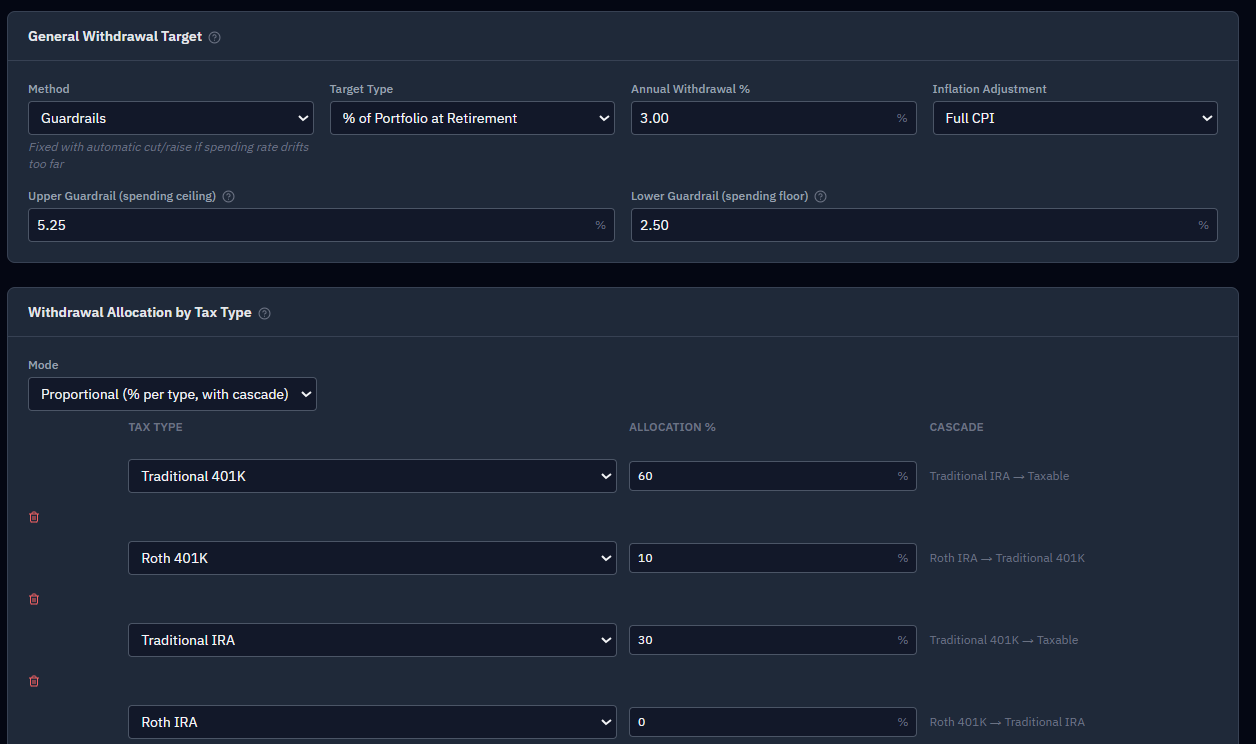
Pick a withdrawal method:
- Classic — a set amount (a % of your portfolio at retirement, or a fixed dollar figure), adjusted only for inflation each year. Predictable; this is the "4% rule" approach, from Bengen’s original 1994 study.
- Dynamic — a fixed percentage of whatever the portfolio is worth each month. Income rises and falls with the market.
- Guardrails — steady spending that automatically trims in bad markets and rises in good ones, keeping your withdrawal rate within set bounds.
And a target type: a percentage of portfolio, a fixed monthly dollar amount, or a percentage-plus-dollar blend.
Using Guardrails? Keep your target inside the band. Your withdrawal target should sit within the guardrail range you set. If the target’s implied rate lands above the upper guardrail (or below the lower one), the guardrail overrides it every month — so moving the target does nothing to your results until it re-enters the band. The Strategy tab flags this inline with the actual numbers (e.g. "Your withdrawal target (12%) is above your upper guardrail (5%) — results reflect the guardrail, not the target"), in both
%and$target modes. It’s a helpful heads-up that your target is inert, not an error.
What the Upper and Lower guardrail percentages actually cost and buy. Guardrails silently rewrite your monthly spending target — down when your withdrawal rate runs hot against the Upper guardrail, up when the portfolio does well and you’re below the Lower guardrail — and the Results tab now shows the dollar effect of both directions: Spending Given Up to Guardrails, Spending Given Up — Worst-Case, Extra Spending From Guardrails, and Months a Cut Applied. Tighten the Upper guardrail and the given-up figure rises; the two given-up figures are the price you pay for the certainty guardrails buy, and they’re only meaningful read next to the bonus figure — a guardrails plan trades some spending certainty for a higher chance the money lasts, not a one-way cut. See Understanding your results for how to read all four together, and note that the AI summary discusses this same trade-off for any plan on the Guardrails method — it’s told both the configured percentages and whether they actually bound, and is instructed to present the cut and the bonus together rather than as pure loss.
Your target is total household spending — not a portfolio-only draw
This is the single most important thing to understand about the withdrawal target, because it differs from how the "4% rule" is usually described.
Your target is what the household spends each month. Guaranteed income sources — Social Security, pensions, and annuities — count toward it, reducing what comes out of your accounts dollar for dollar. Your portfolio makes up the difference.
Example. Your target is $8,000/month and Social Security pays $3,000. RetireRange withdraws $5,000 from your accounts — not $8,000. Before you claim, it withdraws the full $8,000.
This applies to every method and target type — Classic, Dynamic, and Guardrails; percent, dollar, net-of-tax dollar, and percent-plus-dollar. There is no setting that changes it.
Why it matters — two consequences people are often surprised by:
- It isn’t Bengen’s 4% — in two ways. First, the classic 4% rule treats the portfolio draw as 4% with Social Security on top; RetireRange treats the target as your total spending, with Social Security inside it. Second, Bengen’s 4% also has to cover medical costs, whereas RetireRange models medical separately and on top of your target (see Medical spending below). So your target is your lifestyle spending — guaranteed income counted in, healthcare left out. The rule of thumb: put each cost in exactly one place, never both. (For the pure Bengen convention, set your target to spending excluding guaranteed income and turn Net-of-Medical on.)
- Delaying Social Security costs you portfolio dollars up front. During the delay years there’s no SS to offset the target, so your accounts carry the entire load — a larger draw, at the point in retirement when sequence risk bites hardest. The bigger benefit arrives later. That’s a genuine trade-off, and it’s why claiming later isn’t automatically better — see Social Security.
One interaction worth knowing: because guaranteed income shrinks your voluntary withdrawals, it leaves a larger Required Minimum Distribution (RMD) shortfall to be force-drawn from your Traditional accounts (spread evenly across the year), with anything above your spending redeposited to a taxable account. Social Security doesn’t satisfy an RMD — only withdrawals from the account do. See RMDs.
Which accounts to draw from
Set an allocation across account types, in one of two modes:
- Proportional — weight each type (must total 100%); when one runs dry, withdrawals cascade to the next-best type automatically.
- Ordered — a strict priority list (e.g., taxable first, then Traditional, then Roth).
The rows here are account types, not accounts — your individual accounts don’t appear on this tab at all. Everything you hold of a given type is pooled and drawn pro-rata by balance, so a 40% Traditional IRA slice is split across your IRA and your spouse’s in proportion to what’s in each. See holding more than one account of the same type.
Each type belongs on one row only. A row’s Tax Type dropdown offers only the types you haven’t already used, plus that row’s own current value — so you can’t end up with two Traditional 401(k) rows. If a row’s type is no longer offered (for example an HSA switched back to medical-only mode), it is shown marked (unavailable) rather than as another type; change or remove that row.
The table seeds itself from what you hold. If the allocation list is empty and you already have accounts set up, RetireRange fills in a row for each tax type you actually own, split into equal percentages totalling 100% — a working starting point rather than a blank table. That happens once per visit: if you deliberately delete every row, it won’t re-seed until you leave the tab and come back.
The table now follows your accounts as they change, not just when it first seeds. Delete the last account of a tax type — on this tab, on the Accounts tab, by deleting a whole provider, or by changing an account’s tax type away from the last one of its kind — and that type’s allocation row is removed automatically. Its percentage is redistributed across the remaining rows in proportion to what they already had: 20% Roth / 30% Traditional / 50% Taxable, with the Roth account gone, becomes 37.5% / 62.5% — the total stays at 100% and the relative mix you set is preserved. Nothing is redistributed if the removed row was already at 0%. In Ordered mode percentages don’t apply, so the row is simply dropped and the remaining priority order is kept. The reverse also holds: changing an account to a tax type you didn’t previously hold adds a new row for it at 0%, exactly like adding a brand-new account — your existing percentages and the 100% total are left alone, and you choose what share the new type gets. (Medical types — HSA, VEBA — are never added here; medical spending draws through its own VEBA→HSA cascade, not this table.) If you deliberately set a mix like 60/40 and then delete an account, expect the percentages to change — that’s this rule doing its job, not drift. Changed a tax type by mistake? If you change the last account of a type to another type and then change it straight back, before making any other allocation edit, your original percentages come back, with the message "Restored the Withdrawal Allocation percentages you had before."
Two amber advisories flag a mismatch between your accounts and your rows. Neither blocks anything — deliberately leaving a type out is a legitimate strategy:
- "You hold accounts of type X but no allocation row draws from it" — that money will never be spent during retirement. Intentional if you’re preserving it; a mistake if you meant to include it.
- "Allocation row for X has no accounts of that type" — the row is inert. It costs you nothing, but it isn’t doing what you think it is.
How you sequence withdrawals affects your lifetime taxes and how long the money lasts — the allocation optimizer can search this for you.
Medical spending
Medical costs run on their own track: paid from VEBA → HSA → general pool, and added on top of your living expenses by default. Turn on Net-of-Medical if you’d rather hold total spending constant and let medical come out of it. Medicare premiums, the pre-Medicare bridge, and Medigap all flow in here too — see Health insurance bridge.
Powerful extras
- Spending phases — model the go-go / slow-go / no-go pattern instead of flat spending (the default seed steps down 100% → 85% → 70%, with faster medical inflation late). A phase set to end at age N runs until the month you turn N, when the next phase begins.
- Roth conversions — schedule Traditional→Roth conversions. If a conversion rule has no matching account (say, no Roth account to convert into), the tab flags it in amber so a mistyped setup can’t silently do nothing. See Roth conversions.
- Downturn-aware withdrawals — when the market falls (specifically, when the trailing 12-month stock return drops below a threshold you set), the model changes which accounts it sells: instead of your normal allocation, it draws cash first, then bonds, leaving stocks untouched so you’re not forced to sell equities while they’re down. It reverts to your normal order once stocks recover. (VEBA and HSA sit outside this entirely — they’re medical-only and are never drawn for general spending, in a downturn or otherwise.) The point is to blunt sequence-of-returns risk — a crash early in retirement does far more damage if you’re selling into it, because your portfolio is at its largest and every withdrawal sells more shares than it would later. See "If the first five years go badly" on the Results tab for a direct measure of how much sequence risk is costing this plan, and toggle this setting to see the gap narrow. It pairs naturally with a cash reserve (below): spend the cushion in the bad years. Test its effect with what if returns disappoint?; for the exact draining order and thresholds, see the methodology guide.
- Cash reserve — keep a floor of cash so a downturn doesn’t force you to sell stocks low. The field is Months of portfolio withdrawals to keep in cash, and that is precisely what it sizes: each month the floor is your months figure times whichever is larger of (a) the net amount actually coming out of the portfolio — your spending target after Social Security, pension, annuity, rental, and policy-loan income are netted out — or (b) the monthly equivalent of your required minimum distributions. The reserve exists to keep you from force-selling equities to fund either of those, so it’s sized on them rather than on your gross spending. Practical consequence: if a large share of your spending is covered by guaranteed income, "12 months" insures a year of the residual draw, which is a smaller dollar figure than a year of total spending. Older saved plans keep the months number you set; it now buys a right-sized cushion instead of an over-sized one. Optionally turn on recovery refill: in a strong market — when the trailing 12-month stock return clears your threshold (default +10%) — the model tops the reserve back up to its floor from equity gains, so you have dry powder for the next drop. Refill stays within each tax type: it rebalances stocks→cash inside Taxable, or inside Traditional, or inside Roth, but never moves money between them (that would be a real-world distribution or rollover with tax consequences). The target is split as an equal share per cash account across all your tax types, so holding cash in two places refills to the floor you asked for — not to double it. Pairs naturally with downturn-aware withdrawals above — spend the cushion in bad years, refill it in good ones. See Limitations for what the refill doesn’t model.
- The clearest single number for what these two settings buy: Deepest Market Drop — Worst-Case (see Understanding your results). Run your plan once with downturn-aware withdrawals and the cash reserve off, once with them on, and compare that figure on the Compare tab — it’s the sharpest read on what protection you’re buying, and until now the app couldn’t show it at all.
- Rebalancing — steer your portfolio back to a target mix once a year. Without it, nothing moves value between your accounts: each grows at its own return, so a plan that starts 60/40 usually finishes far more equity-heavy than you ever chose, and your results quietly reflect a riskier portfolio than the one you set up. The card sits below Cash Reserve and is off by default (and off for every plan saved before it existed, which keep the old drifting behavior). This is separate from the withdrawal allocation above, which decides which tax types fund your spending, not what the portfolio holds.
- The controls. Tick Rebalance back to a target mix each year, then set a target percentage for each asset class you actually hold (stocks, bonds, cash — only classes that appear on the Accounts tab are offered). Pick the Rebalance month (default January). Optionally tick Only rebalance when the mix has drifted past a band and set the Drift band in percentage points (default 5); the model then acts only when some asset class is at least that far off target. The card needs at least two different asset classes in the household to appear.
- Ticking the box changes nothing by itself. The targets are pre-filled with the mix you hold today, so results only move once you edit a number. Targets that don’t total 100% are scaled proportionally when the plan runs.
- Dollars only move between accounts with the same owner and the same tax type. Moving money from Traditional to Taxable would be a real distribution, and Roth to Traditional would be a conversion, so the model never does either — and never moves money between spouses. A 60/40 401(k) is modeled as a stock account and a bond account of the same tax type, and that pair rebalances fine. But if all your stocks sit in Traditional and all your bonds in Taxable, no pool holds more than one asset class and there is nothing to rebalance. That is a realistic setup, not a bug.
- Rebalancing inside a Taxable account is taxed. Selling an appreciated holding there realizes gains, which count as income that year, exactly as in real life. Inside a 401(k) or IRA it costs nothing. That’s why the drift band is worth using for brokerage money: it avoids selling for small moves.
- Your cash reserve wins. A rebalance never sells cash that is holding the cash reserve floor; it sells only what sits above it. Buying cash is never restricted.
- Warnings on the card. A drift band of 100 points or more gets an amber warning, because no holding can drift that far and rebalancing would never run (typical bands are 5–10 points). A negative drift band is a red error. A target mix with every target at 0% gets an amber warning, because it never moves anything.
- A target for an asset class you no longer hold. The card draws one row per asset class your accounts actually hold. So if you delete your last Cash account, the cash row disappears, but the cash percentage you set is still saved in the target mix. The card keeps that share visible rather than letting it vanish. An amber line under the target grid names it (for example, "cash 10% is still in the target mix, but no account holds cash any more"), and the Targets total line still counts it, so the total reads 100% rather than 90%. The same condition appears as an amber warning in the warning strip under the tab bar and on the Strategy tab’s warning count. Your results are not affected. The plan spreads the target over the asset classes you do hold, so a 54/36/10 stocks/bonds/cash target with no cash account runs exactly like 60/40. The share isn’t deleted for you, because it’s your number. Add an account of that type on the Accounts tab and the share goes back to work. Or click the red ✕ beside the amber line to clear it.
- Changing the target later: a glide path, in waves. Tick Change the target mix later in the plan (a glide path, in waves), below the rebalance month, to add a first wave; Add a wave adds more. Each wave has a Wave N — from age field and its own set of target percentages, with its own total and a line showing the calendar year it takes over. A new wave starts as a copy of the mix before it, so adding one changes no result until you edit a number. Three things to understand about how waves work:
- Waves are steps, not a gradual ramp. Each mix is held until the next wave begins. There’s deliberately no option to slide smoothly from one mix to the next.
- Ages are the age of your household’s oldest person, as the card states, so a wave arrives when the first of you reaches that age.
- This isn’t a target-date fund. The point is to de-risk later — as you approach advanced age and medical needs rise — not necessarily at retirement, when a 65-year-old may still have 35–40 years ahead. Any shape is allowed, including taking more risk before taking less, and the card won’t warn you about an unconventional shape.
- If several waves’ ages have already passed when the plan starts, the wave with the highest age applies from the first month, whatever order the waves are listed in. Each of the other already-passed waves shows an amber warning saying it never takes effect and which wave is in force instead.
- Two interactions with waves. A wave that raises the cash target stacks on top of a cash reserve floor rather than replacing it, and the card says so when both are set, so you don’t double up on protection without meaning to. And every wave that moves money inside a Taxable account realizes gains in that year, so closely spaced waves cost more tax than a few well-spaced ones.
- Waves can hold a leftover target too. A wave copies the mix before it, so a wave can still carry a share for an asset class you no longer hold even after you have edited the base mix back to 100%. Each wave’s own total counts that share, and the amber line says "(here or in a wave)". The red ✕ clears the asset class from the base mix and from every wave at once.
- How to test it: run the plan with rebalancing off, then on, and compare on the Compare tab. Watch success rate and legacy together, and the taxes paid in a plan with a large brokerage account.
- One-Time Withdrawals — one-time expenses (a renovation, a gift) in a chosen year. Each row has a Draw From dropdown: leave it on My withdrawal allocation (the default) to fund the expense from your normal allocation, or pick a tax type — Taxable, Traditional, Roth — to source it from that type first. The engine draws pro-rata across every account of that type, cascades to the next type if it depletes, and falls back to your normal allocation for any remainder. Because the tax treatment follows the source (Traditional adds ordinary income; Roth or Taxable is mostly tax-free at the moment of withdrawal), choosing the source is a way to control the tax hit of a planned expense. Medical-only types (HSA, VEBA) are excluded. Two amber warnings guard the year you pick: one if the year is before your plan starts (nothing has begun yet), and one if it falls between plan start and retirement — one-time withdrawals only fire in the drawdown phase, so a pre-retirement event would silently never happen. That second warning carries a
Convert →link that moves the event to the Pre-Retirement Withdrawals card below, keeping its label, year, and amount and auto-picking your first non-medical account (re-pick it if that guess is wrong). See big one-time expense. Not sure which source is best? The optimizer can search it for you — one Lump Sum Source dimension per event. - RMDs are smoothed automatically — any forced RMD catch-up is spread evenly across the year (always on; not a toggle).
- HSA "stealth IRA" — pay medical from VEBA (and out of pocket) first and let the HSA grow untouched until a chosen age, so it compounds tax-free. It’s one of the highest-leverage tax moves available if you have the cash flow to pay medical bills another way: the IRS lets you reimburse today’s medical receipts in any future year, so — as long as you keep the receipts — deferring HSA withdrawals costs you nothing, and the balance keeps growing tax-free. One caveat to weigh: a leftover HSA left to a non-spouse heir is fully taxable as ordinary income — in real life the whole balance is taxed in the year of death, with no step-up and none of the 10-year spreading an inherited IRA gets, so if anything it’s harsher than inheriting a Traditional account. Either way it’s not a tax-free bequest to the kids (a spouse inherits it tax-free; the account’s Beneficiary setting controls which applies). (RetireRange models this as a flat ordinary+state haircut on the ending balance — it captures the tax hit, not the year-of-death timing.) The payoff of stealth is the tax-free growth and tax-free medical reimbursements during your life, not a legacy tax break to the next generation. A/B test it: run with stealth on, then off, and compare the HSA ending balance and after-tax legacy (P50) on the Compare tab. The cost shows up there too — faster drawdown of your Traditional/Roth/taxable accounts during the deferral years, and possibly a bit more taxable income from the extra Traditional withdrawals. See Limitations for the inheritance assumption.
Where the Cash Reserve Actually Lives
There is no separate "reserve account." The reserve is simply every account you hold whose asset class is Cash, added together across your whole household. Setting a 12-month floor doesn’t create anything — it tells the model how much of your existing cash to hold back from ordinary withdrawals.
Three consequences worth knowing:
You choose where the reserve sits by choosing which account holds the cash. Want the cushion inside a Traditional IRA rather than your brokerage? Add a Traditional IRA on the Accounts tab with Cash as its asset class. That is the only control — there’s no "reserve location" setting. A cash reserve inside a Traditional account is a real, modelable strategy: required distributions are pooled across everything you hold of the same type, and they’re drawn through the same machinery ordinary spending uses — so in a downturn the cash sleeve is sold to satisfy the RMD and the equity sleeve is left alone, and in normal markets at the reserve floor the RMD comes from the non-cash sleeves so the cushion is preserved.
The floor is measured household-wide, but refills stay inside a tax type. The model compares your total cash against the floor. When it rebuilds the cushion, though, it can only sell stocks for cash within the same tax type. A cash account in Traditional is refilled from your Traditional stocks, never from your brokerage.
A brand-new cash account can start at $0 — the refill will fund it. But refills only fire after a strong market, when the trailing 12-month stock return clears your refill threshold, so the money arrives in lumps and may not arrive for years. If you want the cushion in place from day one, start the account with a balance or direct contributions into it before you retire.
The Modeling Convention Worth Adopting
One habit makes all of this behave the way you’d want: model each asset class as its own account within a plan. A single 401(k) split between stocks and cash is two accounts in RetireRange — one Traditional 401(k) holding stocks, one holding cash — both owned by the same person.
Nothing is lost by doing that, because the engine treats them as one plan where it matters:
- RMDs pool across everything you own of the same tax type, matching the IRS’s own aggregation rule. Your Traditional IRA requirement can be satisfied from any Traditional IRA you hold; no sleeve has to cover its own share.
- In a downturn, cash drains first — which means the required distribution comes out of the cash sleeve rather than force-selling equities at the bottom.
- You manage the investment mix inside each plan, exactly as you would in real life.
One loose edge: two separate employer plans of the same tax type held by the same person also pool. The dollars distributed and taxed are identical either way — the only difference is which sleeve gets sold.
Withdrawing before you retire
The Pre-Retirement Withdrawals card models the accumulation-phase sibling of one-time withdrawals: "in year Y, month M, take $X out of account A — before I retire." Use it for a down payment, a tuition bill, or any raid on a retirement account while you’re still working. (The One-Time Withdrawals card above only fires once drawdown begins; this card is the right home for anything earlier.)
Each row takes a label, a year, a month (1–12), a gross dollar amount, and an account — a month outside 1–12 is an error on the field (it is not quietly rounded to December). The dropdown lists your non-medical accounts only, since HSA and VEBA balances are reserved for medical spending. If you have no eligible accounts, the Add button is disabled and says so.
What the engine does: it reduces that account by the gross amount in the month you name, after that month’s contributions and returns are booked — so the money compounds right up to the withdrawal and then leaves. Rows flag themselves in amber if the year is before your plan starts (it won’t fire), if it lands at or after retirement (it still fires, but a one-time withdrawal is the better fit), or if the account has since been deleted (the engine skips it).
What the withdrawal costs. A withdrawal from a Traditional account counts as ordinary income in the year you take it, and the 10% penalty, when it applies, is drawn from the account as well. Early distributions therefore cost more in the forecast than the gross alone. If the draw is bigger than the balance, the withdrawal clamps to what’s there.
Penalty details
Every row has a collapsible Penalty details panel. The toggle itself tells you the answer without expanding — it reads "— 10% penalty applied" or "— no penalty." Inside:
- Entry mode — "I’ll enter the gross to remove" (the default) or "I need this much cash in hand." Choose cash-in-hand and a Cash needed field appears; RetireRange grosses it up for the 10% penalty (when it applies; income tax is not grossed up), so the engine removes the right amount to net out to the cash you asked for after the penalty. The gross is recalculated on every run from the account’s current tax type and the owner’s current birth date, so editing either on another tab keeps it correct. The Gross $ field goes read-only in that mode.
- Exception — a dropdown of IRS §72(t) exceptions that waive the 10% penalty, shown only when you’re under 59½ and the account isn’t Taxable. Options are filtered to your account’s tax type: first home ($10,000 cap), higher education, and unemployed health-insurance premiums are IRA-only; medical expenses over 7.5% of AGI, disability, birth or adoption ($5,000), the SECURE 2.0 emergency withdrawal ($1,000/yr), and federal disaster ($22,000) apply to both IRAs and employer plans. Substantially-equal-payment (SEPP) streams aren’t modeled.
- Rule of 55 — a checkbox that appears only on an employer plan (401(k)/403(b)/457(b)) when you’d be between 55 and 59½. It asserts you separated from that employer in or after the year you turned 55, which waives the penalty on that plan only.
- Penalty toggle — the rules above set the default, but you can override it. A Reset to default link appears once you have.
- Marginal tax rate (optional) — used only to show a net-cash-in-hand line ("gross $71,000 minus 10% penalty and 25% marginal tax = …"). It is never applied to your portfolio. A rate outside 0–100% is a warning, not an error, since it only affects that displayed estimate.
- Rationale — a plain-English line explaining the determination ("Under 59½, Traditional 401(k), no matching exception → 10% penalty on the gross"), noting when you’ve overridden the default, and always closing with "Confirm with a tax advisor."
RetireRange never asserts a tax determination. The rationale line and the override toggle exist precisely so the final call stays with you and your advisor.
Roth basis
Picking a Roth account sets where the withdrawal comes from; it doesn’t say what you’re taking. Before 59½, RetireRange assumes you’re taking earnings: the whole withdrawal counts as ordinary income in that year, and the 10% penalty applies unless an exception covers it. On a Roth IRA the panel adds a Roth basis checkbox: "This is a Roth IRA contribution / basis." Tick it to say you’re taking your own contributions instead. From a Roth IRA, contributions come out first, at any age, with no penalty and no income tax, up to your basis.
RetireRange does not track per-account basis. Ticking the box is your assertion that the amount you’re pulling is contributions, not earnings. That’s why it defaults off. With it on, both the penalty and the income tax are switched off, the exception dropdown and penalty toggle disappear (both are redundant), and the net-cash line shows the full gross. A marginal rate no longer changes anything.
Three things to know before relying on it:
- Contributions-first is a Roth IRA rule, so the box appears only on a Roth IRA. A Roth 401(k), 403(b) or 457(b) doesn’t release contributions first. An early withdrawal there is split pro-rata between contributions and earnings, so part of it is taxed and penalized however much you’ve contributed. On those accounts an amber note takes the checkbox’s place and says so. Because RetireRange doesn’t track your basis, it treats the whole withdrawal as earnings. That’s deliberately pessimistic: your real cost depends on your basis and may be lower. A plan saved earlier with the box ticked on an employer-plan Roth keeps the setting, but it’s now ignored, so that withdrawal’s penalty goes up.
- With the box off, the earnings are taxed as well as penalized. The whole withdrawal goes into that year’s taxable income, so it flows through federal and state tax, the taxable share of Social Security, and the next year’s IRMAA lookback. An exception or the Rule of 55 removes the penalty only. The income tax still applies, and the rationale line says so: "Earnings in a non-qualified Roth distribution are ordinary income…"
- The 5-year rule isn’t modeled. A Roth IRA withdrawal is qualified only once you’re 59½ and the account is five years old. RetireRange has no account-open date, so it treats any withdrawal at 59½ or older as qualified. That can understate tax if you opened the Roth recently.
Capped exceptions
Four exceptions cap the exempt amount: first home ($10,000), birth or adoption ($5,000), emergency ($1,000/yr), and federal disaster ($22,000).
When your gross is within the cap, the exception covers it and the penalty toggle stays off. When your gross exceeds the cap, the penalty toggle defaults on and the rationale explains why — "First home purchase exception covers up to $10,000; the remaining $20,000 is above the cap — 10% penalty on the gross applied by default." An amber note adds: flip the toggle off only if you know the exemption covers the full amount. The default is deliberately the conservative reading; you can override it.
Walk through a full example in What if I have a big one-time expense?.
Once your strategy is set, head to the Results tab and run it.
Saving and returning. Save a recipe you like with the Strategies button (it becomes a named strategy you can compare). Two toolbar buttons manage your baseline: Save Baseline (⚓) sets your current plan as the baseline everything is measured against, and Load Baseline (⤺, right beside it) snaps the working state back to that saved baseline after you’ve been experimenting — the inverse of loading a scenario.