
Other Income: Pensions, Annuities, and Property
Your portfolio and Social Security aren’t the only things that can fund retirement. RetireRange also models pensions, income annuities, rental property, and other income like a part-time job or consulting. Each is income that reduces how much you have to draw from your investments. Adding them makes your plan more realistic, and the guaranteed income is especially valuable in the early years, when leaning less on the portfolio protects you from sequence-of-returns risk.
Pensions
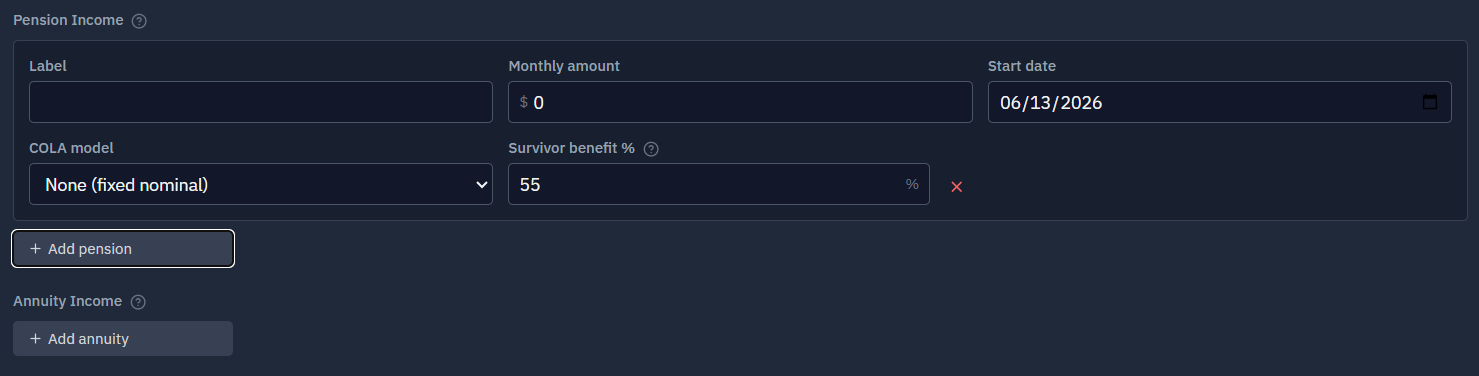
Add one or more pensions per person (or any fixed recurring income — military retirement, a defined-benefit plan, etc.):
-
Monthly amount (in today’s dollars) and a start date. Income that starts before retirement is paid from its own start date (not held until retirement); it is deposited to your first taxable account and any taxable part is taxed as income, so plans with early-start income show higher balances.
-
End date and Fixed term (stops after) — two optional ways to make a pension stop. End date is the last month it pays. Fixed term is a number of monthly payments, counting the first one: a 10-year term is 120, so 120 payments starting January 2025 end December 2034. Leave both blank for income that pays for life — that’s the default, and it’s how every pension worked before these fields existed. If you set both and they disagree, the earlier stop applies and an amber warning tells you which one won. An end date before the start date, or a term that isn’t a whole number of 1 or more, is an error that blocks the run until you fix it.
- Check older plans. Before October 2026 a pension or annuity always paid until the end of the plan (or the owner’s death). If you entered a term pension, a bridge or supplement, or a period-certain-only annuity in an earlier version, that plan overstates your income for every year after the payments really stop. Add the end date or term and re-run.
- A survivor benefit runs only within the term. If a bounded pension has a survivor percentage, the survivor receives it for the payments that remain, not beyond the end.
-
COLA — how it grows: none (fixed nominal), with general inflation, or a fixed rate you set.
-
Survivor percentage — the fraction that continues to the surviving spouse when the pension holder dies (e.g., a 50% joint-and-survivor benefit). This ties into surviving-spouse modeling. A new pension starts at 0%, so it pays nothing to your spouse unless you set it — enter your survivor percentage only if your pension has a joint-and-survivor election. Leaving it at 0 is exactly right for a single-life pension: the model won’t invent a survivor benefit you won’t actually receive. (Annuities work the same way — 0% unless yours carries a survivor benefit.)
-
Military retirement pay — tick this for military retired pay. Many states exempt it on different terms from a civilian pension, and usually at any age. The checkbox is the only thing that marks a pension as military — naming an entry "Military retirement" doesn’t, so tick the box. It’s off by default.
-
Government pension — No — private employer (the default), Federal government, or State or local government. For a state or local pension, also choose Paid by which state: the state whose retirement system pays it, which isn’t always where you live now. (Hidden when Military retirement pay is ticked, since military pay has its own rules.)
-
Federal retirement plan — for a Federal government pension: Not sure (the default), CSRS or FERS. It matters in four states, Idaho, Minnesota, Nebraska and Vermont, which exempt CSRS annuities and tax FERS ones. Not sure gets no exemption, so set it if you’re a CSRS annuitant there. To tell which you have, check the first digit of the account number on your CSA-1099: 0–4 is CSRS, and 7 or 9 is FERS. A first digit of 8 means OPM pays part from each system. In that case, enter the annuity as two pensions using the split on your Notice of Annuity Adjustment, and mark one of each.
Pension income is taxable at the federal level and flows into your yearly tax picture. Whose pension it is matters for state tax. States apply their retirement exclusions per person, using that person’s own age, so enter each pension under the person who receives it. Neither checkbox nor dropdown changes your federal tax — they only tell RetireRange which state rule applies. See Taxes for each state’s treatment of military pay, and Government pensions for why the paying state matters.
Moving changes how a government pension is taxed. Arizona, Kansas, Louisiana and Massachusetts exempt their own public pensions (and federal ones) but not another state’s; Indiana’s break is for federal civil service only, and Missouri’s covers any government’s. The pension keeps the state that pays it, so a Massachusetts teacher’s pension is exempt while they live in Massachusetts and taxed in full if they move to Arizona. Leave Paid by which state unselected and RetireRange treats it as another state’s — the less generous reading. One simplification: Massachusetts exempts only contributory plans, and RetireRange assumes every government pension is one.
Retiring twice? If you drew a pension from a first career (military, police, fire, federal) and are now retiring from a second job, you model the second retirement and add the pension here — the walkthrough is in Already collecting a pension?.
Income annuities
Annuities (SPIA, DIA, or QLAC) work like pensions, with a couple of annuity-specific additions:
- Exclusion ratio — for a non-qualified annuity (bought with after-tax dollars), part of each payment is a tax-free return of your principal. Set the tax-free fraction here. (IRA/401(k)-funded annuities are fully taxable — exclusion ratio 0.)
- QLAC — a Qualified Longevity Annuity Contract held inside a Traditional IRA. Flagging it as a QLAC lets the premium defer the RMDs that would otherwise apply to that money until the annuity’s payments begin — a real longevity-and-tax planning tool. See RMDs.
Like pensions, annuities carry a COLA, a survivor percentage, and the optional End date and Fixed term (stops after) fields described above.
Leave the fixed term blank for a life annuity — including a "life with 10-year certain" contract. That guarantee only pays your heirs if you die early. You are paid for life, and entering the 10 years here would stop your income after it. Use the fixed term only for income that really ends while you’re alive: a term or bridge pension, or an annuity that is period-certain only. RetireRange has no refund-of-premium or cash-refund option. A fixed term simply stops paying, with nothing going to your estate. A QLAC’s RMD deferral is unaffected by an end date.
A note on the percentage fields. The survivor percentage (pension and annuity) and the annuity exclusion ratio must be between 0% and 100%. Enter something outside that range and RetireRange shows a clear error (e.g. "Alex: pension #1 survivor benefit of 150% must be between 0% and 100%") and blocks the run until you fix it, so a typo can’t silently change your plan.
Rental property (and modeling a home sale)
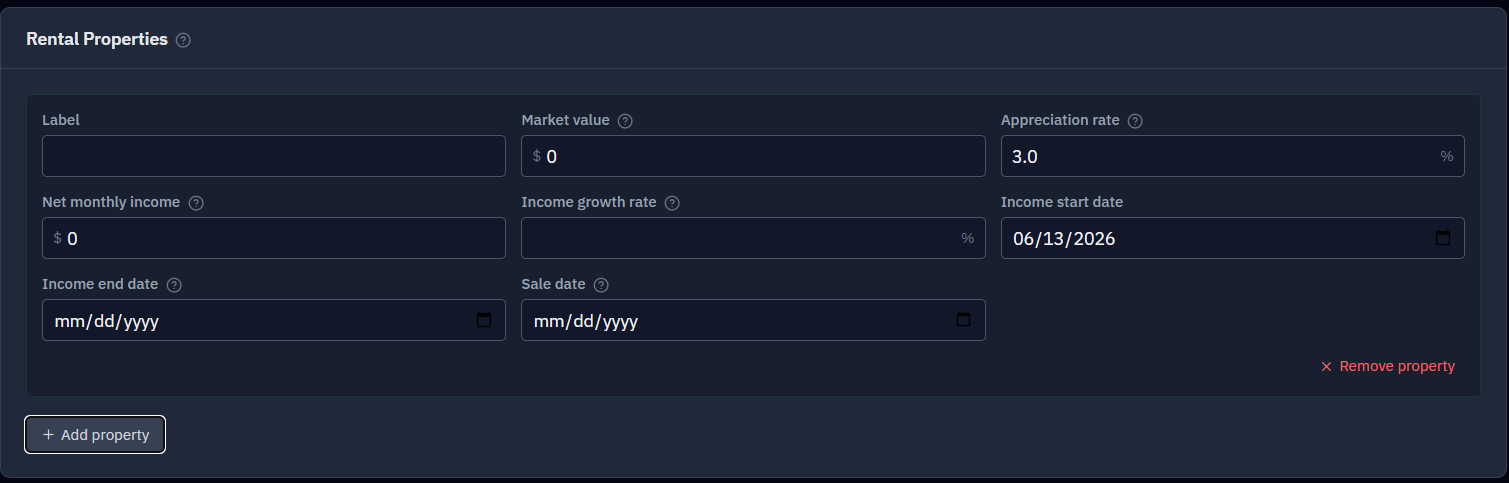
Add property at the household level. Each property can contribute two things to your plan:
- Net rental income — a monthly amount (with its own start/end dates and growth rate, or general inflation), added to your spending power.
- Appreciating value — the property grows at the appreciation rate you set and is included in your total-wealth trajectory and your legacy (your ending balance and after-tax legacy). It’s treated as illiquid, though: RetireRange never sells it to fund spending, so — unless you model a sale — a growing property lifts your legacy and ending-balance numbers but does not improve your plan’s success rate. Only rental income and, if you sell, the deposited proceeds actually fund spending.
You can also model a sale: set a sale date and the net proceeds (in today’s dollars — net of selling costs and any replacement home, i.e. only the cash that actually reaches your portfolio, since the model makes the full amount available to spend), and RetireRange deposits that lump sum into an account you choose when the sale happens — point it at a taxable (brokerage) account, since a cash windfall like a home sale can’t go into a 401(k) or IRA — the dropdown lists only Taxable accounts, so you can’t misroute it. That’s exactly how you model downsizing your home: set the rental income to zero, give it a sale date and the cash you’d free up, and the proceeds land in your taxable account. See what if I downsize my home?
What sets the sale price: the net proceeds you enter (today’s dollars, inflation-adjusted to the sale date) — not the appreciation rate. If you leave the proceeds blank, RetireRange instead uses the property’s appreciated value at that date.
Part-time work and other earned income
A part-time job, consulting fees, royalties, a side business, an installment payout: any recurring income that doesn’t come out of an investment account goes on the Other Income card. It’s on the Accounts tab, directly below Rental Properties.
Click Add income stream and fill in:
- Label: your name for it (e.g. "Part-time consulting"). It’s shown on the income chart and the year-by-year breakdown.
- Who earns it: the person doing the work, or Household. A person’s stream stops when that person dies, since nobody else does their consulting. A Household stream runs until the last death or its end date, whichever comes first.
- Monthly amount: in today’s dollars, before tax. For a job, enter your gross pay. RetireRange withholds the payroll tax itself, so don’t net it out first.
- Growth rate: leave it blank to grow with inflation, or enter a fixed annual raise.
- Start date and End date: when the work begins and ends. Leave the end date blank if it runs to the end of the plan (or until the earner’s death).
- Tax treatment: one of three choices:
- Ordinary income is taxed at your ordinary federal and state rates and nothing else. Royalties and an installment payout usually belong here.
- Earned income (wages / self-employment) is taxed as ordinary income plus payroll tax, and it interacts with Social Security (see below). Use it for a paycheck or self-employment.
- Tax-free income is excluded from taxable income entirely.
- Paid as: appears only for earned income.
- Employee (W-2 wages) pays the employee half of payroll tax.
- Self-employed (1099 / own business) pays both halves, roughly twice as much, so choose carefully.
You can add as many streams as you have sources, and remove one with Remove income stream.
How the model treats it
- It offsets your withdrawals dollar for dollar, before and after retirement. If you earn more than you spend, the surplus is deposited to your first taxable account rather than lost.
- Payroll tax is withheld at the source each month for earned income. That covers Social Security tax up to the year’s wage base (which rises each year with the plan’s inflation, as SSA indexes it), Medicare with no cap, and the Additional Medicare Tax at high incomes. For the self-employed, half of the self-employment tax is deducted from taxable income, as it is on a real return. Because the tax is withheld, it’s never paid by selling investments. Rates and wage bases are on the Reference Data tab.
- On the Monthly Retirement Income chart it has its own teal Other Income band. That band shows what you actually receive after payroll tax, so for earned income it reads lower than the monthly amount you entered.
Working while collecting Social Security
If the earner claims Social Security before full retirement age and has earned income, the earnings test applies: $1 of benefit is withheld for every $2 earned above an annual exempt amount, or $1 for every $3 above a higher amount in the year they reach full retirement age. From the month of full retirement age on, there’s no test at any income level.
The withheld benefits aren’t lost. At full retirement age the benefit is permanently recalculated as though the claim had been made that many months later, so over a normal lifespan most of the withholding comes back. Think of it as a deferral, not a penalty. Only earned income counts toward the test; pensions, annuities, rental income and portfolio withdrawals never do. More in Social Security.
A higher future benefit
Extra working years can raise your own Social Security benefit. RetireRange credits earned streams toward it only when you import your SSA statement on the Household tab and choose Recompute PIA from earnings history. In that panel, the option to count the person’s Other Income earned streams is ticked by default. If you enter your benefit estimates by hand, a modeled part-time job doesn’t change them.
Name the earner. The earnings test and the benefit credit are both personal, so an Earned income stream left on Household gets neither. RetireRange shows an amber note when that happens. Pick the person doing the work instead.
The quick alternative. If you just want a rough sense of how much a few working years help, you can instead lower your withdrawal target for those years with spending phases. The recipe What if I work part-time in early retirement? covers both approaches. The shortcut is less faithful, though: that income is never taxed, never touches Social Security, and can’t show earnings larger than your spending.
The smaller simplifications that remain, such as the earnings test’s special first-year rule, are listed in Limitations.
Why it matters
- Guaranteed income is longevity insurance. Pensions and lifetime annuities keep paying no matter how markets or your lifespan turn out, and they’re inflation-aware if you give them a COLA.
- Less portfolio strain early = lower sequence risk. Every dollar of outside income is a dollar you don’t withdraw during the portfolio’s most vulnerable years.
- A few working years go a long way. Part-time income early in retirement shortens the stretch when the portfolio is most exposed to a bad run of returns.
- Survivor protection. Set survivor percentages so the model reflects what the surviving spouse would actually keep.
For how these streams show up in your results, see Understanding your results; unfamiliar terms are in the Glossary.