
Getting Started
Welcome. This guide walks you from a blank slate to your first simulation in about 15 minutes — and points you to the deeper guides when you’re ready for them. You don’t need any financial or technical background, and you don’t need every number to be perfect. RetireRange is built for exploration: enter your best estimates and refine as you go.
A quick note on what this is: RetireRange is an educational planning tool — a model, not a prediction, and not a replacement for personalized advice from a financial professional. It shows you a range of possible outcomes so you can ask better questions about your own plan. See Limitations for the full picture.
What you’ll need
Gather these before you start. Estimates are fine — you can change anything later.
- Birth dates — for you, and your spouse or partner if you’re planning as a couple. The setup wizard checks its year answers: Continue refuses a missing or out-of-range year and names the allowed range (birth years run from 120 years ago to 14 years ago). (RetireRange models one person or a couple; it doesn’t add children or other dependents.)
- Target retirement dates (the year is enough). A future date models an accumulation phase — contributions and growth — up to that date, then switches to withdrawals. Already retired? Enter your real (past) retirement date instead: when a retirement date falls on or before the plan’s start, RetireRange skips the accumulation phase entirely and models you as retired from day one.
- Social Security estimates — your projected monthly benefit at ages 62, Full Retirement Age, and 70, from your statement at ssa.gov. Plus the claiming age you currently plan to use. Easier option: download your statement data XML from your my Social Security account (Download Your Statement Data → XML) and import the file directly on the Household tab — see Social Security.
- Account balances as of today — for each 401(k), IRA, Roth, taxable, HSA, or VEBA account.
- Monthly contributions you’re still making, and whether they stop at retirement.
- Monthly spending estimate in retirement (non-medical living expenses).
- Monthly healthcare estimate — what you expect to pay for insurance and out-of-pocket costs.
Signing up. Creating an account takes an email address and a password — nothing financial. See Account and security for the password requirements, the referral code box, and the Terms/Privacy agreement.
You never connect a bank or brokerage. RetireRange pulls nothing automatically — every number is one you choose to enter, and your work is only saved when you save a scenario.
Your first simulation, step by step
RetireRange is organized into tabs. For your first run, move left to right through the first four, then press Run.
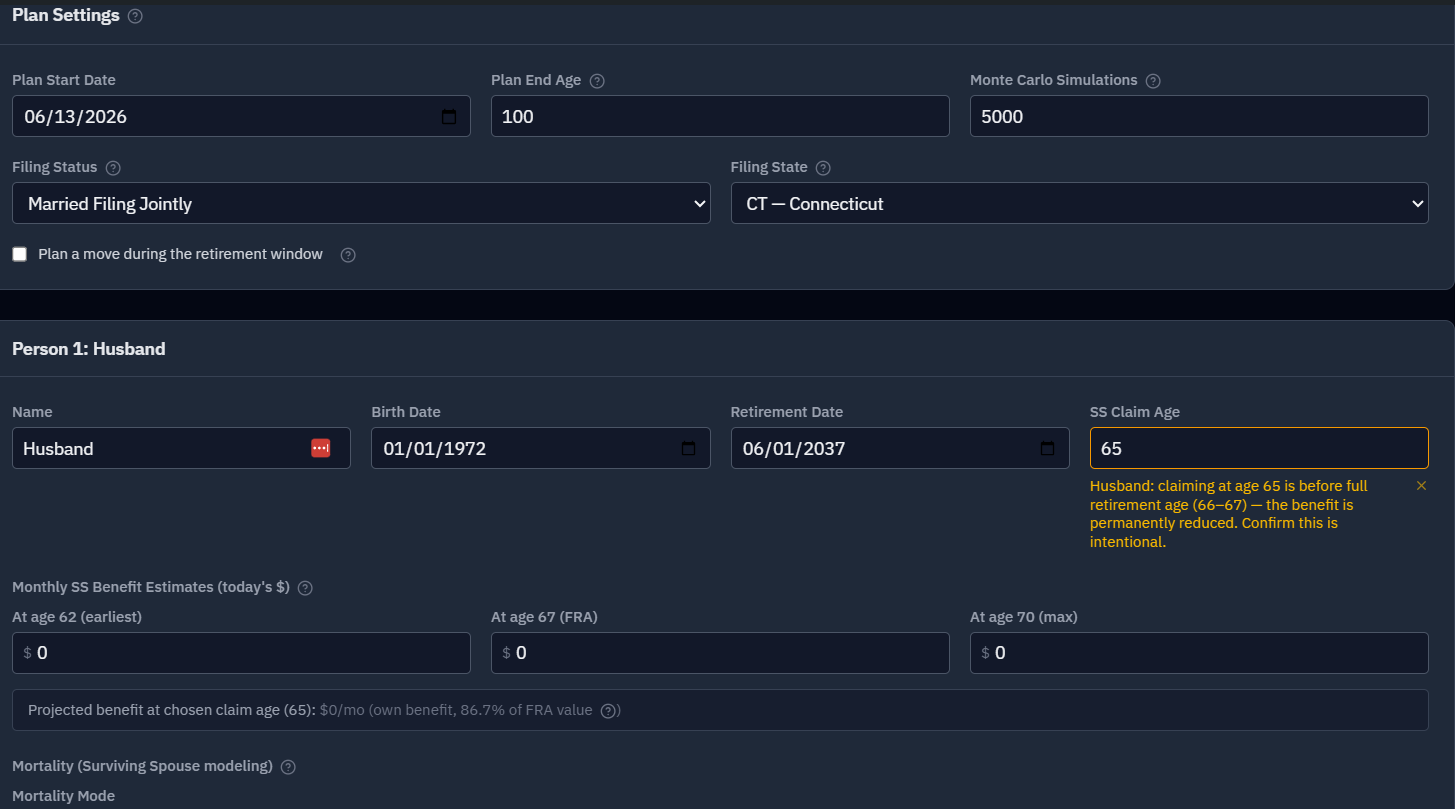
1. Household
Open the Household tab and add each person’s birth date, target retirement date, Social Security claiming age, and the three SSA benefit estimates. Set your plan end age (we suggest 95–100 — it’s a planning horizon, not a prediction of your lifespan, and a higher number is more conservative). Leave mortality on "None" for now. → Full detail: Household tab
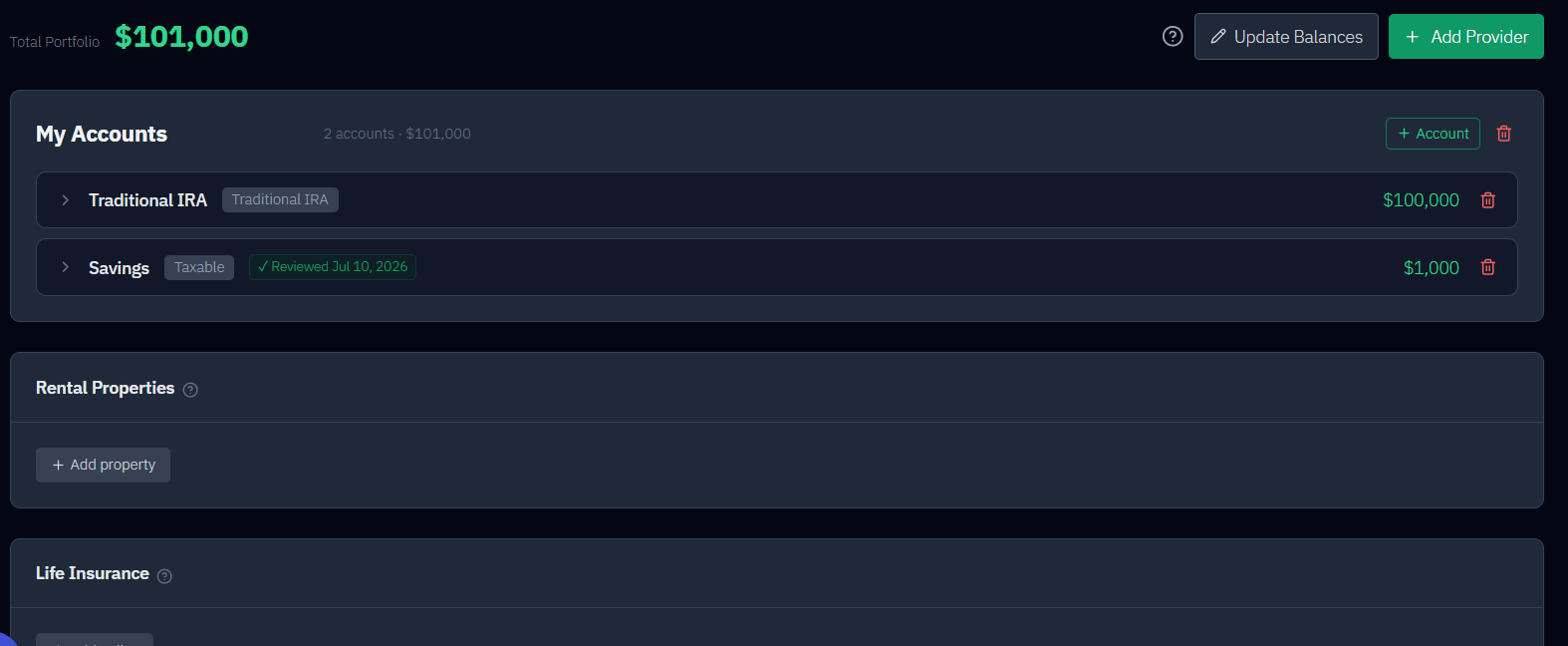
2. Accounts
On the Accounts tab, add your accounts with today’s balances and any ongoing contributions. Each account has a tax type (Traditional, Roth, Taxable, HSA, VEBA) and an asset class (Stocks, Bonds, Cash, VEBA). By default, medical accounts (HSA, VEBA) are reserved for healthcare, not tapped for general living expenses. → Full detail: Accounts tab
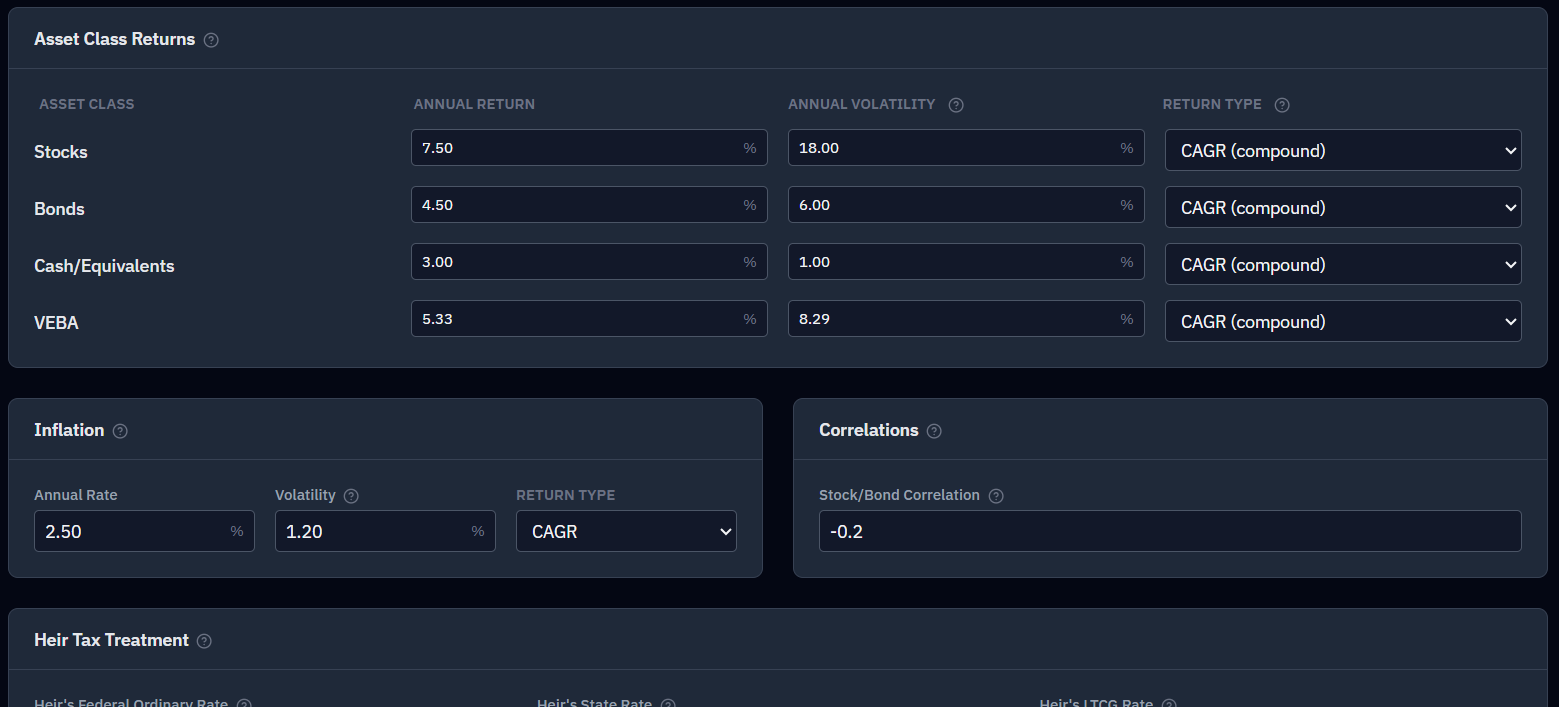
3. Assumptions
The Assumptions tab sets expected returns, volatility, and inflation. You can leave these at their defaults for your first run. New scenarios generate returns by block bootstrap — resampling blocks of real market history (1928–2025) — so your first run is grounded in what markets actually did. Come back later to stress-test more conservative numbers. → Full detail: Assumptions tab
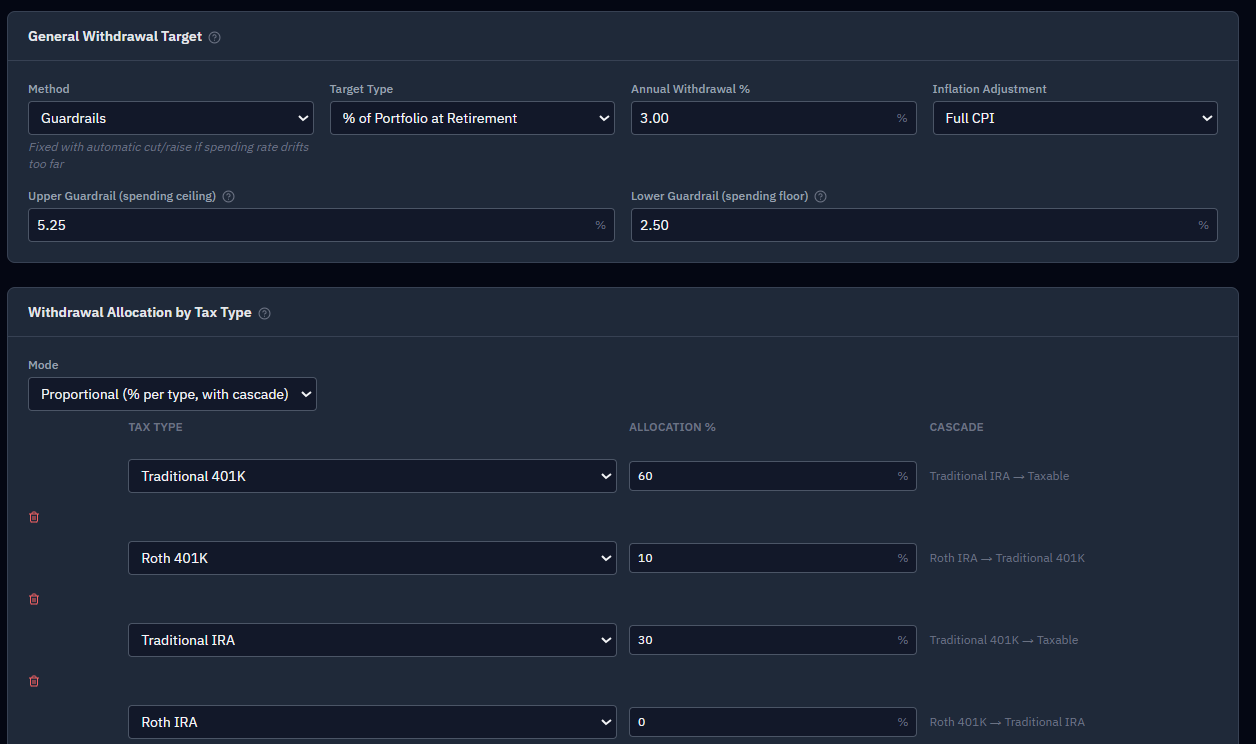
4. Strategy
On the Strategy tab, choose how you’ll draw your money: pick a withdrawal method (Classic, Dynamic, or Guardrails), set your monthly spending target, enter your healthcare estimate, and choose which accounts to draw from. Defaults are a fine starting point. → Full detail: Strategy tab
5. Run it
Go to the Results tab and click Run Simulation. RetireRange runs 5,000 randomized market futures for your plan and finishes in a few seconds.
Spotted a mistake mid-run? Stop it. While a simulation is running, the Run Simulation button becomes a red Cancel (■). One click ends the run immediately and returns the button to normal — no error, nothing to dismiss. Fix the input and run again.
Reading your first result
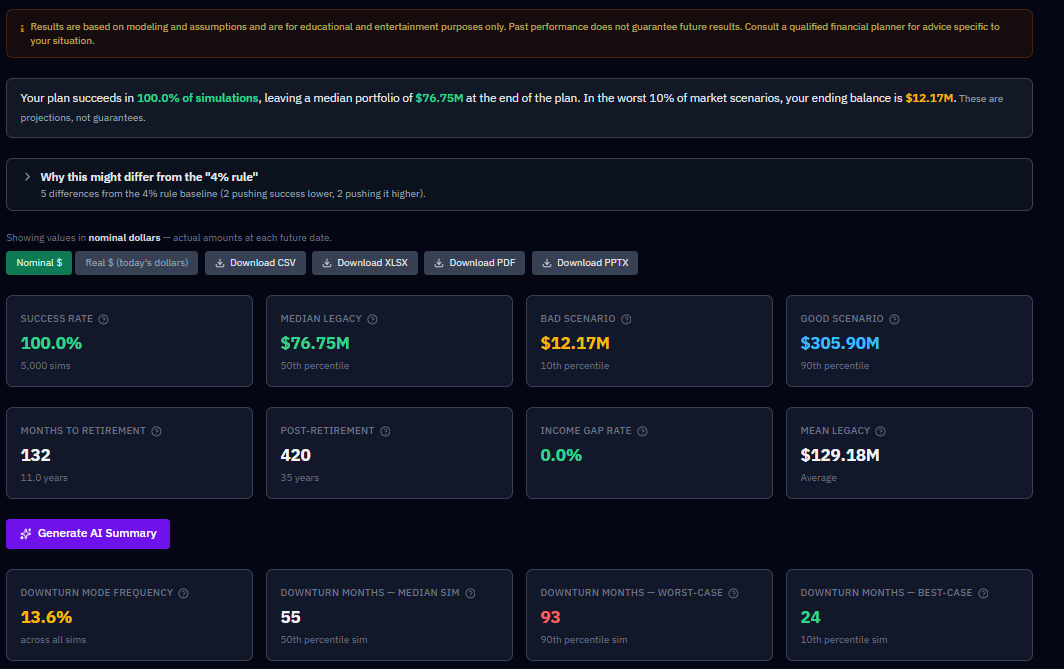
The Results tab is organized around six questions, with a bar pinned to the top that jumps between them. Start with the first one, Will my money last?, and three things in it:
- Success Rate — the share of those 5,000 futures in which your money lasted to your plan end. Think of it as resilience, not a grade. (A 99% rate can actually mean you’re underspending and leaving a large unplanned legacy.)
- The trajectory chart — the shaded bands are your range of outcomes over time; the center line is the typical (median) result. A wide band means more uncertainty.
- Income Gap Rate — how often you’d have had to trim spending below target, even briefly.
Then work down the others — where your income comes from, what you’ll pay in tax, how bad it can get, and what would change the outcome. For what these mean and how to act on them, see Understanding your results.
The part that matters most: iterate
A single run is just the start. RetireRange is built to come back to:
- Save this run as a named scenario (e.g., "Baseline — retire 2032"). → Scenarios
- Change one thing — a claiming age, a spending level, a retirement date — and run again.
- Compare the two head-to-head on the Compare tab, which runs them against the same market sequences so the difference reflects your decision, not luck.
That loop — change something, see your odds move — is the whole point. And once you have a plan you like, the job becomes keeping it honest over time: see Keeping your plan current for the few-times-a-year check-in.
Where to go next
Once you’re comfortable, explore the decisions that move the needle most:
- Social Security — claiming age can swing six figures over a lifetime; the Optimizer can find the best age for you.
- Roth conversions — weigh tax now against RMDs later.
- Health insurance bridge — cover the gap between retiring and Medicare.
- Surviving spouse — model the financial impact of one partner outliving the other.
- Historical backtest — replay your plan against real markets from 1928 on.
And whenever you’re weighing real decisions, RetireRange is the prep work — bring what you learn here to your financial advisor to make that conversation sharper.